
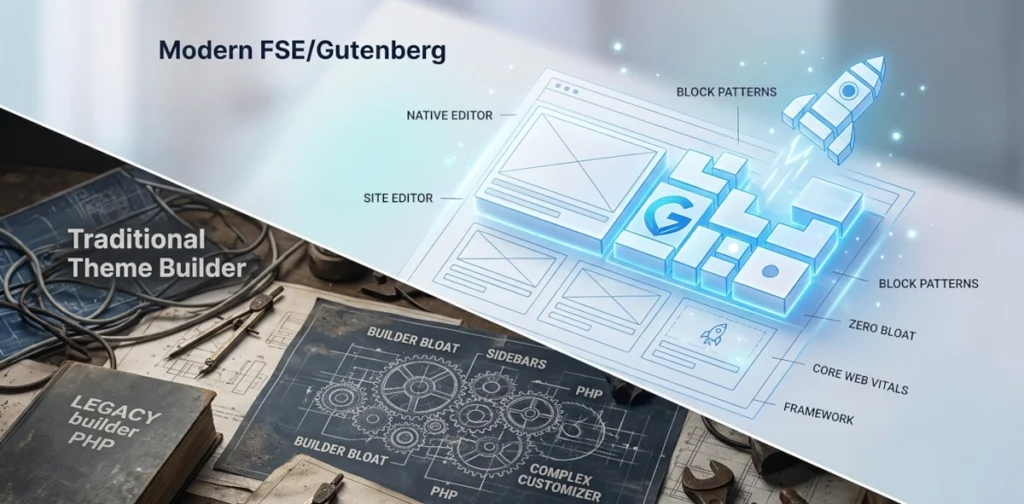
For years, building a WordPress website required an unspoken compromise. If you wanted deep design control without writing code, you had to install heavy, third-party page builders. While these tools offered visual freedom, they often introduced a mountain of script bloat, dragging down page speeds and complicating the backend.
The native WordPress ecosystem has shifted entirely to close this gap. Through Full Site Editing (FSE) and modern Block Themes, the core software now handles complex layout engineering natively.
Here is everything you need to know about how this structural shift works, the top independent frameworks leading the charge, and how they compare head-to-head.
1. The Architecture: What is an FSE Block Theme?
To understand a block theme, it helps to look at how old-school WordPress themes function. Legacy themes rely on PHP templates to dictate the structure of your site. If you want to move a navigation menu, alter a sidebar, or completely change a footer layout, you are restricted to whatever dials and knobs the theme author built into the static Customizer menu.
Block themes throw out that entire paradigm. They swap out complex PHP files for streamlined HTML templates packed with native block markup.
With Full Site Editing (FSE), the site layout engine treats every single zone of your website as an editable canvas.
The Structural Shift
In a traditional setup, you use blocks only inside the post editor to write content, while a theme controls the rest of the page. In an FSE environment, you use the exact same block tools to design your header, construct your main layout templates, build your archive loops, and assemble your footer.
This brings two massive technical advantages to modern web projects:
- Drastic Performance Gains: Because the site loads native HTML markup instead of executing complex database calls for external builder styles, out-of-the-box page speeds and Core Web Vitals improve instantly.
- A Single Design Interface: Freelancers, content creators, and developers no longer have to jump between a theme options page, a plugin dashboard, and the standard editor. Everything uses the same unified block interface.
2. Five Leading FSE Frameworks for Modern Production
The block directory is full of experimental layouts, but these five production-grade frameworks stand out for their stability, utility, and clean engineering.
Twenty Twenty-Five (The Core Benchmark)
The official default theme serves as the foundational proof-of-concept for what native WordPress can achieve. It is highly optimized, ultra-lightweight, and packed with complex block patterns specifically designed to handle everything from personal portfolios to complex multi-author blogs without breaking a sweat.
Ollie (The UX Pioneer)
Ollie tackles the biggest hurdle in modern WordPress: the steep learning curve of the native editor. It sets a new standard for user onboarding by including an elegant setup walkthrough and an incredibly cohesive layout library that lets users assemble high-end business layouts using pure core blocks.
Spectra One (The Blank Page Canvas)
Built by the engineering team behind Astra, Spectra One takes a unique approach by stripping out traditional theme settings entirely. It leaves a completely blank, performance-optimized slate meant to combine flawlessly with the block editor, giving you the feel of an advanced layout builder without the associated performance penalties.
Neve FSE (The Fast-Track Commercial Option)
An FSE evolution of a classic theme family. Neve FSE adapts the highly responsive, mobile-first philosophy of its predecessor into a modern block format. It is a fantastic option for anyone migrating an existing small business site or an e-commerce store into the modern Gutenberg era.
Frost (The Developer’s Clean Framework)
Frost is a hyper-minimalist block theme focused entirely on structural utility. Created for developers, digital agencies, and designers who want a clean canvas, it avoids aesthetic fluff and focuses on pristine grid layouts, clean spacing, and structural perfection.
3. Head-to-Head Comparison
Choosing a block theme comes down to identifying where you need assistance – whether that is intuitive design patterns, a blank developer canvas, or commercial flexibility.
| Framework | Primary Ideal Use Case | Standout Architectural Feature | Design Philosophy |
| Twenty Twenty-Five | Editorial Sites & Portfolios | Massive array of default style palettes | 100% Native Core Blueprint |
| Ollie | Client Builds & Business Sites | Automated configuration wizard and layout library | Structured & Cohesive Core Patterns |
| Spectra One | Custom Layout Frameworks | Zero-bloat framework optimized for blocks | Clean Canvas Hybrid |
| Neve FSE | Digital Shops & Content Hubs | Advanced mobile optimization and shop layouts | Performance-Driven Commercial |
| Frost | Agencies & Minimalist Creators | Hyper-clean block spacing and utility layouts | Pure Minimalist Blueprint |
Summary: Mapping Out Your Implementation
- If you want to master the absolute purest form of native block editing, build your project on Twenty Twenty-Five.
- If you are hand-off styling a site to a client and want a seamless layout setup path that prevents them from breaking things, use Ollie.
- If you are building an e-commerce portal or dynamic corporate layout that demands rapid responsiveness, look toward Neve FSE or pair Spectra One with utility block extensions.